pixel art photos - Pixelator1.5
Publisher Description
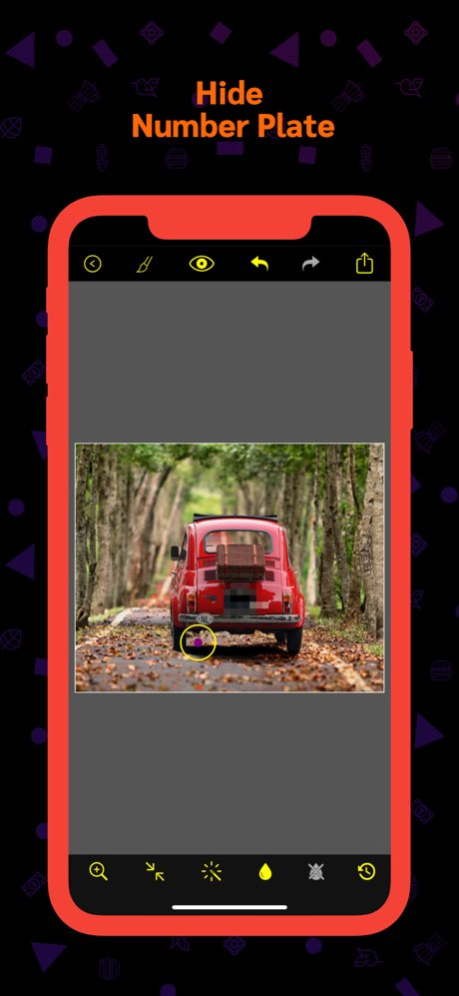


Protect your privacy and censor sensitive content in photos with Pixelate photos - censor photo, the ultimate photo editing tool for blurring and pixelating. Whether you need to obscure faces, private information, or any other confidential details, this app makes it easy and effective.
Features:
■ Import photo from Camera, files app or from photo library
■ Change pixelate intensity and brush size
■ Zoom and Pan photo to precisely pixelate photo portions
■ Save pixelated photo to library
■ Share pixelated photo on Facebook, Instagram & Twitter
■ Instant mail pixelated photo
■ Reset photo to it's default at any time
Version History Minor bugs fixed
UI updated
Performance improved 1.5 6d ago Import photos from files app added
Dark mode added
Minor bug fixed
Performance improved
UI updated 1.4 08/21/2023 Minor bug fixed 1.3 10/30/2021 Minor bug fixed 1.2 10/27/2021 Minor bug fixed 1.1 07/01/2016 1.0 05/19/2016
About pixel art photos - Pixelator
The company that develops pixel art photos - Pixelator is Sounak Sarkar. The latest version released by its developer is 1.5.
To install pixel art photos - Pixelator on your iOS device, just click the green Continue To App button above to start the installation process. The app is listed on our website since 2026-10-06 and was downloaded 14 times. We have already checked if the download link is safe, however for your own protection we recommend that you scan the downloaded app with your antivirus. Your antivirus may detect the pixel art photos - Pixelator as malware if the download link is broken.
How to install pixel art photos - Pixelator on your iOS device:
- Click on the Continue To App button on our website. This will redirect you to the App Store.
- Once the pixel art photos - Pixelator is shown in the iTunes listing of your iOS device, you can start its download and installation. Tap on the GET button to the right of the app to start downloading it.
- If you are not logged-in the iOS appstore app, you'll be prompted for your your Apple ID and/or password.
- After pixel art photos - Pixelator is downloaded, you'll see an INSTALL button to the right. Tap on it to start the actual installation of the iOS app.
- Once installation is finished you can tap on the OPEN button to start it. Its icon will also be added to your device home screen.
Program Details
System requirements
Download information
Pricing
Version History
version 1.5
posted on 2026-10-06
Version History Minor bugs fixed
UI updated
Performance improved 1.5 6d ago Import photos from files app added
Dark mode added
Minor bug fixed
Performance improved
UI updated 1.4 08/21/2023 Minor bug fixed 1.3 10/30/2021 Minor bug fixed 1.2 10/27/2021 Minor bug fixed 1.1 07/01/2016 1.0 05/19/2016
version 1.5
posted on 2026-10-02
Version History Minor bugs fixed
UI updated
Performance improved 1.5 2d ago Import photos from files app added
Dark mode added
Minor bug fixed
Performance improved
UI updated 1.4 08/21/2023 Minor bug fixed 1.3 10/30/2021 Minor bug fixed 1.2 10/27/2021 Minor bug fixed 1.1 07/01/2016 1.0 05/19/2016
version 1.4
posted on 2026-09-25
Version History Import photos from files app added
Dark mode added
Minor bug fixed
Performance improved
UI updated 1.4 08/21/2023 Minor bug fixed 1.3 10/30/2021 Minor bug fixed 1.2 10/27/2021 Minor bug fixed 1.1 07/01/2016 1.0 05/19/2016
version 1.4
posted on 2026-09-04
Version History Import photos from files app added
Dark mode added
Minor bug fixed
Performance improved
UI updated 1.4 08/21/2023 Minor bug fixed 1.3 10/30/2021 Minor bug fixed 1.2 10/27/2021 This app has been updated by Apple to prepare for watchOS 27 compatibility. No new features are included.
Minor bug fixed 1.1 07/01/2016 1.0 05/19/2016
version 1.4
posted on 2026-08-22
Version History Import photos from files app added
Dark mode added
Minor bug fixed
Performance improved
UI updated 1.4 08/21/2023 Minor bug fixed 1.3 10/30/2021 Minor bug fixed 1.2 10/27/2021 This update from Apple will improve the functionality of this app. No new features are included.
Minor bug fixed 1.1 07/01/2016 1.0 05/19/2016
version 1.4
posted on 2023-08-21
Aug 21, 2023
Version 1.4
Import photos from files app added
Dark mode added
Minor bug fixed
Performance improved
UI updated
version 1.4
posted on 2023-08-21
Import photos from files app added
Dark mode added
Minor bug fixed
Performance improved
UI updated
version 1.3
posted on 2021-10-30
Oct 30, 2021 Version 1.3
Minor bug fixed
version 1.1
posted on 2016-07-01
Jul 1, 2016 Version 1.1
Minor bug fixed
version 1.1
posted on 2016-07-01
Jul 1, 2016 Version 1.1
This app has been updated by Apple to use the latest Apple signing certificate.
Minor bug fixed
